
Industrial IoT Guide
How Milesight routers, IoT SIM cards, MQTT, VPNs and VPS hosting can work together to create smarter, safer and more useful edge computing systems.
Node-RED turns an industrial 4G or 5G router into far more than a connectivity device. Used properly, it can help collect data, automate decisions, reduce mobile data usage, monitor connected equipment and send useful information to cloud dashboards without making every remote site over-complicated.
This matters because many IoT projects do not fail because the idea is bad. They fail because the system is too fragile, too cloud-dependent, too exposed, or too awkward to support once it leaves the workshop and ends up in a cabinet, plant room, compound, pump station or remote building.
Why Industrial Routers Are No Longer Just Routers
For years, an industrial router was mainly seen as a way to get equipment online. You installed the router, inserted a SIM card, connected the Ethernet cable and hoped the remote device stayed connected.
That is still important. Reliable 4G and 5G connectivity is the foundation of many IoT, M2M, CCTV, SCADA, building management and industrial automation deployments. But the router market has moved on.
A modern industrial router can now do much more than provide internet access. With the right hardware and software, it can collect data from local equipment, translate protocols, run logic, trigger alerts, send MQTT messages, support secure VPN access and act as a compact edge computing platform.
This is where Node-RED becomes extremely useful.
Node-RED is a visual programming tool that allows engineers, installers and technically minded users to build automation flows without writing a full software application from scratch. Instead of building everything line by line in code, you connect blocks together. Each block performs a task, such as reading a value, filtering data, sending a message, calling an API or triggering an alert.
When Node-RED is combined with industrial 4G and 5G routers, especially capable gateway-style hardware from Milesight routers, the router becomes the bridge between the physical world and modern cloud systems.
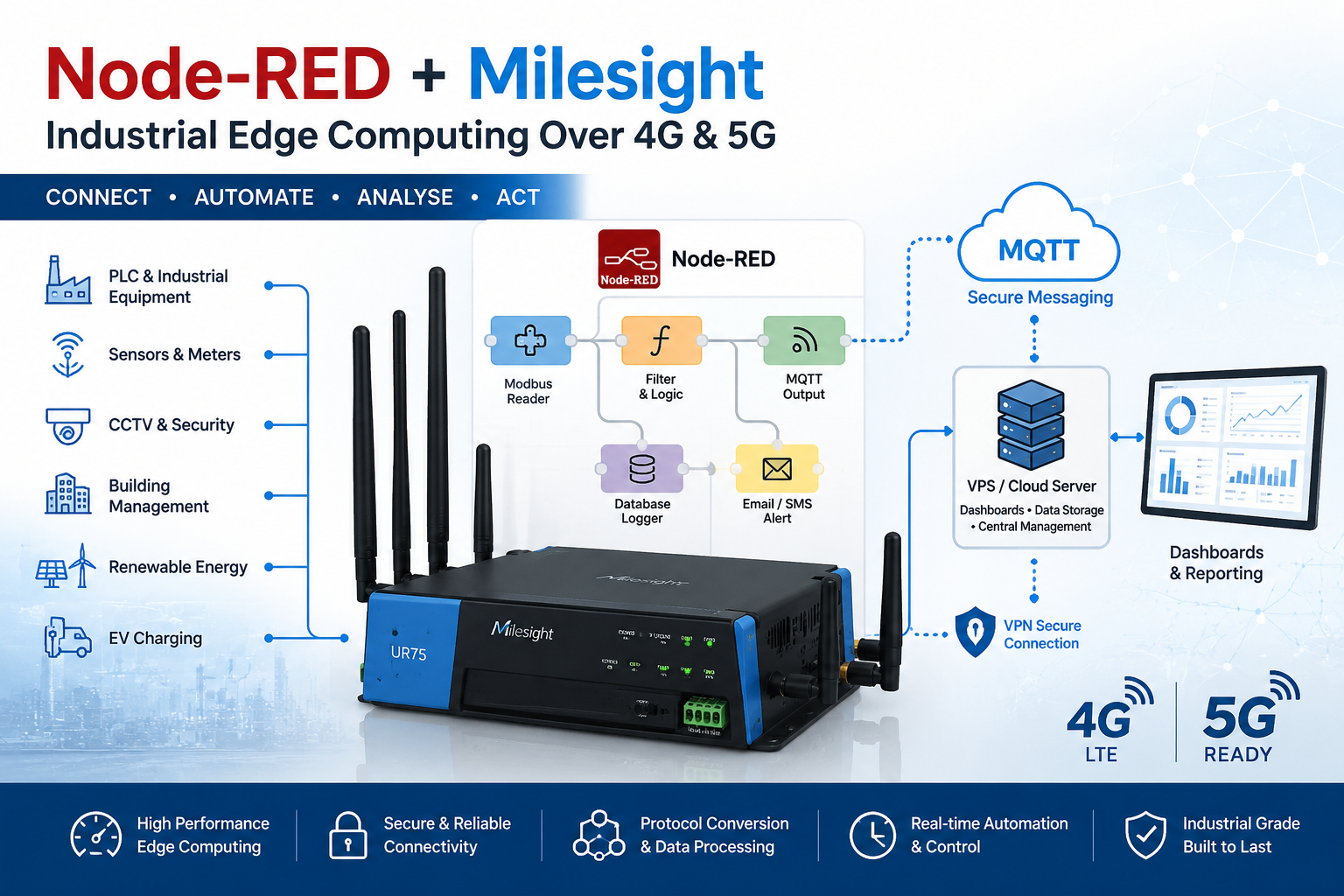
Simple View: From Field Device To Cloud
The Problem: Remote IoT Sites Are Often Too Cloud-Dependent
Many IoT systems are designed around a simple idea: collect data from equipment and send it to the cloud. On paper, that looks neat. In the field, it can be wasteful and fragile.
A remote cabinet, pumping station, CCTV site, EV charger, weather station, building controller or industrial machine may send a constant stream of readings back to a cloud platform. Some of that data matters. Much of it does not.
This creates several problems:
- Unnecessary mobile data usage because every reading is sent over the cellular network.
- Slow reactions because decisions depend on data travelling to and from a remote server.
- Cloud dependency because local logic may stop working if the internet connection fails.
- Higher complexity because every small site needs to be integrated into a larger platform.
- Security risk if devices are exposed directly to the internet for remote access.
For non-critical monitoring, this may be acceptable. For industrial IoT, it is often not good enough. The better approach is to process data at the edge where possible, then send only useful information onwards.
The practical point is simple: do not send everything to the cloud just because you can. Send the data that has value. Process the rest locally.
The Solution: Edge Computing With Node-RED And Milesight Routers
Edge computing means running logic close to the equipment. Instead of sending every raw reading back to a cloud platform, the local gateway performs useful work first.
That may include filtering, checking thresholds, converting protocols, storing values locally, sending alerts or forwarding selected data to a server.
In a 4G or 5G deployment, the industrial router is often the ideal edge device. It is already installed on site. It already has power. It already connects the local equipment to the mobile network. If it can also run logic, process data and integrate with cloud platforms, the whole system becomes simpler.
This is the real value of using Node-RED with industrial routers.
Why Milesight Routers Are A Strong Fit For Node-RED IoT Projects
Milesight has become a serious name in industrial IoT because its routers and gateways are designed for more than basic internet access. They are built for real installations where engineers need dependable cellular connectivity, remote management, industrial interfaces and practical integration options.
A basic router might be good enough for a payment terminal or a simple internet backup. But once you start talking about edge computing, MQTT, Modbus, remote monitoring, industrial automation and secure access, you need a more capable gateway.
That is where Milesight fits well.
Reliable Connectivity
Industrial 4G and 5G connectivity gives remote sites a practical route online where fixed-line broadband is unavailable, slow, unsuitable or controlled by someone else.
Edge Intelligence
Instead of acting as a simple pipe to the internet, the router can support local processing, data filtering, alerts and protocol conversion.
Secure Access
VPN access helps engineers reach remote systems without exposing routers, cameras, PLCs or controllers directly to the public internet.
Practical Integration
Milesight routers fit well in real IoT projects where Ethernet devices, industrial protocols, sensors, dashboards and cloud platforms need to work together.
Milesight routers can be used in applications such as remote monitoring, industrial automation, building management systems, SCADA connectivity, CCTV and site security, smart agriculture, environmental monitoring, EV charging, renewable energy sites and remote asset management.
The key point is not simply that the router connects to 4G or 5G. Plenty of routers can do that. The key point is that a Milesight router can sit at the edge of the network and help make the installation more intelligent.
What Node-RED Can Actually Do On An Industrial Router
Node-RED is useful because it handles the awkward middle layer between devices, data and applications.
For example, a remote industrial site may have an energy meter using Modbus, a PLC on Ethernet, a relay input, a local sensor and a cloud dashboard that expects MQTT. Without Node-RED, that integration can become messy. With Node-RED, the router or gateway can read the data, process it and forward it in a clean format.
Common Node-RED Uses With 4G And 5G Routers
- Modbus to MQTT conversion: read Modbus registers from meters, PLCs or controllers and publish clean MQTT topics.
- Alarm processing: trigger alerts when values exceed thresholds or devices stop responding.
- Data filtering: send only important changes rather than constant raw readings.
- Local automation: run simple logic at the site without waiting for cloud approval.
- API integration: send processed data to third-party platforms, databases or dashboards.
- Email and SMS alerts: notify maintenance teams when something needs attention.
- Protocol bridging: connect legacy industrial systems to modern IoT platforms.
- Remote diagnostics: monitor router status, signal strength, device uptime and connectivity.
Modbus To MQTT: One Of The Most Useful Applications
One of the strongest use cases for Node-RED in industrial IoT is Modbus to MQTT conversion.
Modbus is still common in industrial equipment. Energy meters, PLCs, generators, HVAC controllers, pumps and monitoring devices often support Modbus RTU or Modbus TCP. It is reliable and widely understood, but it is not ideal for modern cloud applications.
MQTT, on the other hand, is lightweight and well suited to IoT. It works well over cellular networks because it is efficient, flexible and designed for messaging between devices and applications.
Node-RED can sit between the two. It can read Modbus registers, convert the values into meaningful names, apply logic, then publish the results to an MQTT broker. That broker might be hosted on a cloud platform, inside a private system or on a VPS.
Example
A power meter reports voltage, current and energy usage over Modbus. Node-RED reads the values every minute, checks for abnormal readings, publishes normal data to MQTT and sends an alert if the voltage drops outside a safe range.
Using Node-RED For CCTV And Security Sites
CCTV systems are often installed over 4G or 5G where fixed broadband is unavailable. Most people focus only on remote viewing, but there is a bigger opportunity.
Node-RED can help monitor the health of the site itself.
For example, a flow could check whether an NVR is reachable, monitor camera status, log router uptime, track signal quality and send an alert when a device goes offline. This is useful for temporary sites, compounds, farms, car parks, utilities, construction projects and remote commercial properties.
The router provides connectivity. Node-RED provides intelligence. The IoT SIM provides managed network access. A VPS can provide central logging and dashboard access.
Using Node-RED For Building Management Systems
Building Management Systems often involve mixed protocols and awkward network access. HVAC controllers, meters, sensors, relays, alarms and environmental systems may all need to be monitored or integrated.
A Milesight router with Node-RED can provide an independent route into the building systems without relying entirely on the customer’s IT network. This can be useful for maintenance companies, facilities managers, landlords and system integrators.
Node-RED can collect data from connected systems, process it locally and send selected information to a central platform. It can also support alerting, remote diagnostics and simple automation.
Using Node-RED For EV Charging And Renewable Energy
EV charging sites, solar farms, wind monitoring systems and battery storage installations are often distributed across many locations. Each site may need reliable connectivity, monitoring and remote support.
Node-RED can help gather charger status, meter readings, inverter data, battery state, temperature readings and fault codes. Instead of sending every raw value continuously, the system can process data locally and send useful events or summaries.
This is a sensible architecture for sites where mobile data usage, uptime and remote support costs matter.
The Role Of IoT SIM Cards
A capable router still needs the right SIM card. This is where many projects fall down.
A consumer SIM may work during testing, but business and industrial IoT deployments usually need more control. Depending on the application, you may need private IP addressing, a private APN, VPN access, multi-network roaming, pooled data, usage alerts or centralised SIM management.
For Node-RED applications, the SIM is not just providing general internet access. It may be carrying MQTT data, VPN traffic, remote diagnostics, dashboard updates and alert messages.
| SIM Option | Best Used For | Important Note |
|---|---|---|
| Standard data SIM | Testing and basic connectivity | Usually limited for secure remote access and management. |
| Roaming IoT SIM | Remote sites where more than one mobile network may be needed | Router settings and network behaviour still need proper configuration. |
| Fixed IP SIM | Remote access to routers and connected equipment | Must be secured carefully to avoid exposing devices to the internet. |
| Private APN SIM | Secure industrial and enterprise deployments | Often best combined with VPN access and proper firewall rules. |
Why A VPS Makes Node-RED Even More Powerful
Running Node-RED at the edge is useful, but a VPS can make the architecture much more powerful.
A VPS, or Virtual Private Server, gives you a low-cost cloud server that you control. It can be used to host services such as MQTT, dashboards, databases, VPN servers, reverse proxies, logging tools and central Node-RED instances.
This creates a strong architecture:
- The Milesight router handles the remote site.
- Node-RED at the edge handles local logic.
- The IoT SIM provides cellular connectivity.
- The VPN provides secure access.
- The VPS provides central services and long-term storage.
For a deeper practical guide, see Node-RED on a VPS.
This is a much better model than trying to expose every router, camera, controller or PLC directly to the internet. The VPS becomes the controlled meeting point. Remote sites connect outbound to it, engineers connect securely to it, and data can be collected centrally.
Recommended Architecture: Edge Router Plus IoT VPS
Edge Node-RED Versus VPS Node-RED
The best answer is usually not edge or cloud. It is both.
Node-RED running at the edge is best for local decisions, fast response, protocol conversion and reducing unnecessary data. Node-RED running on a VPS is better for central dashboards, long-term storage, multi-site automation and user access.
| Function | Best At The Edge | Best On A VPS |
|---|---|---|
| Fast local decisions | Yes | No |
| Protocol conversion | Yes | Sometimes |
| Central dashboard | Limited | Yes |
| Long-term storage | Limited | Yes |
| Multi-site management | No | Yes |
Security: Do Not Expose Industrial Devices Directly To The Internet
One of the biggest mistakes in cellular IoT is exposing routers, cameras, PLCs or controllers directly to the public internet.
Fixed public IP SIM cards can be useful, but they must be treated carefully. Port forwarding from the public internet into a remote site can create unnecessary risk if firewalls, passwords, firmware and access controls are not properly managed.
A better approach is usually to use private addressing, VPN access and a controlled VPS or private network gateway.
The router should be a secure gateway, not an open door. That means VPN-first access, sensible firewall rules, strong credentials and no casually exposed admin interfaces.
For Node-RED deployments, security should include:
- VPN-only remote access where possible
- Strong passwords and unique credentials
- Firewall rules limiting access to trusted sources
- Encrypted MQTT using TLS where appropriate
- Regular firmware and package updates
- Restricted Node-RED editor access
- Private APN or private IP SIM options for critical systems
- Monitoring for failed logins and unusual traffic
Why This Matters For Installers And Systems Integrators
For installers, Node-RED creates a commercial opportunity. It allows you to offer more than hardware installation.
Instead of simply supplying a router and SIM, you can build useful logic into the solution. You can create monitoring flows, alerting systems, dashboards, MQTT integrations and remote diagnostics. That creates more value for the customer and more defensible recurring revenue for the provider.
It also reduces support pain. If the system can detect problems earlier, log useful information and alert the right person, you spend less time guessing what has gone wrong.
Typical Industries That Can Benefit
Utilities
Water, wastewater, pumping stations and energy monitoring sites often need reliable remote access and event-based reporting.
Construction Sites
Temporary CCTV, access control, environmental monitoring and site connectivity can all benefit from router-based automation.
Building Management
BMS contractors can integrate meters, controllers, sensors and cloud platforms without relying fully on a customer IT network.
Renewable Energy
Solar, battery and wind installations need reliable communication from remote locations and clear fault visibility.
Agriculture
Farms can use 4G and 5G routers for irrigation, weather data, tank levels, gates, livestock monitoring and CCTV.
Industrial Automation
Factories and remote assets can use Node-RED for machine monitoring, production data, alerts and protocol conversion.
Practical Deployment Checklist
Before deploying Node-RED with an industrial router, it is worth planning the system properly.
- Confirm which equipment needs to be connected.
- Identify the protocols involved, such as Modbus, MQTT, HTTP or Ethernet.
- Decide what data needs to be processed locally.
- Decide what data needs to be sent to the cloud or VPS.
- Choose the correct Milesight router or gateway.
- Select the right IoT SIM for the application.
- Use VPN access rather than exposing services directly.
- Secure the Node-RED editor and dashboard.
- Document the flows clearly for future maintenance.
- Test failover, reboot behaviour and recovery after signal loss.
Build The System Properly From The Start
A good industrial IoT deployment is not just a router and a SIM. It is a secure architecture. Milesight routers provide the edge gateway, Node-RED provides the logic, the IoT SIM provides cellular access, VPN protects remote support, and a VPS gives you a controlled central platform.
Start with the hardware, but design the whole system. Read more about Milesight routers and see how the central server side can work in this guide to Node-RED on a VPS.
Conclusion: The Router Is Becoming The Edge Platform
The old view of a router as a simple internet box is outdated.
In modern IoT, the router is becoming the edge platform. It connects the site, protects access, processes data, runs logic and bridges the gap between industrial equipment and cloud systems.
Node-RED makes this practical because it gives engineers and integrators a flexible way to build useful applications without starting from a blank software project.
Milesight routers are a strong fit because they are designed for real industrial IoT deployments, not just basic connectivity. Add the right IoT SIM, a secure VPN architecture and a VPS for central services, and you have a powerful, scalable and secure model for remote monitoring and automation.
For many businesses, this is the sensible way forward: intelligence at the edge, secure connectivity over 4G or 5G, and central control through a VPS or cloud platform.
FAQ
What is Node-RED used for in IoT?
Node-RED is used to connect devices, sensors, routers, APIs, MQTT brokers, databases and dashboards. In IoT, it is especially useful for automation, protocol conversion, alerting and edge data processing.
Can Node-RED run on a 4G or 5G router?
Node-RED can run on suitable edge-capable routers and gateways, depending on the hardware, firmware and available processing resources. In many deployments, Node-RED may run directly on the gateway or on a connected VPS.
Why use Milesight routers for industrial IoT?
Milesight routers are designed for industrial and IoT applications where reliable cellular connectivity, remote management, security and integration with field equipment are important.
What is the benefit of using a VPS with Node-RED?
A VPS can host central services such as MQTT, dashboards, databases, VPN servers and central Node-RED flows. This makes it easier to manage multiple remote sites from one controlled platform.
Is Node-RED secure?
Node-RED can be used securely, but it must be configured properly. Access to the editor and dashboards should be restricted, credentials should be strong, communications should be encrypted where appropriate, and remote access should normally be handled through a VPN.
Do I need an IoT SIM card?
For serious remote monitoring and industrial applications, an IoT SIM is usually better than a standard consumer SIM. IoT SIMs can provide better management, roaming options, private networking, fixed IP options and usage controls.
Can Node-RED reduce mobile data usage?
Yes. Node-RED can filter data locally and send only useful readings, changes or events instead of sending every raw data point over the mobile network.
Is this suitable for SCADA and industrial automation?
Yes, but it must be designed properly. Node-RED can be useful for SCADA-adjacent monitoring, protocol conversion and reporting, but critical control systems should be carefully secured and engineered by competent professionals.