
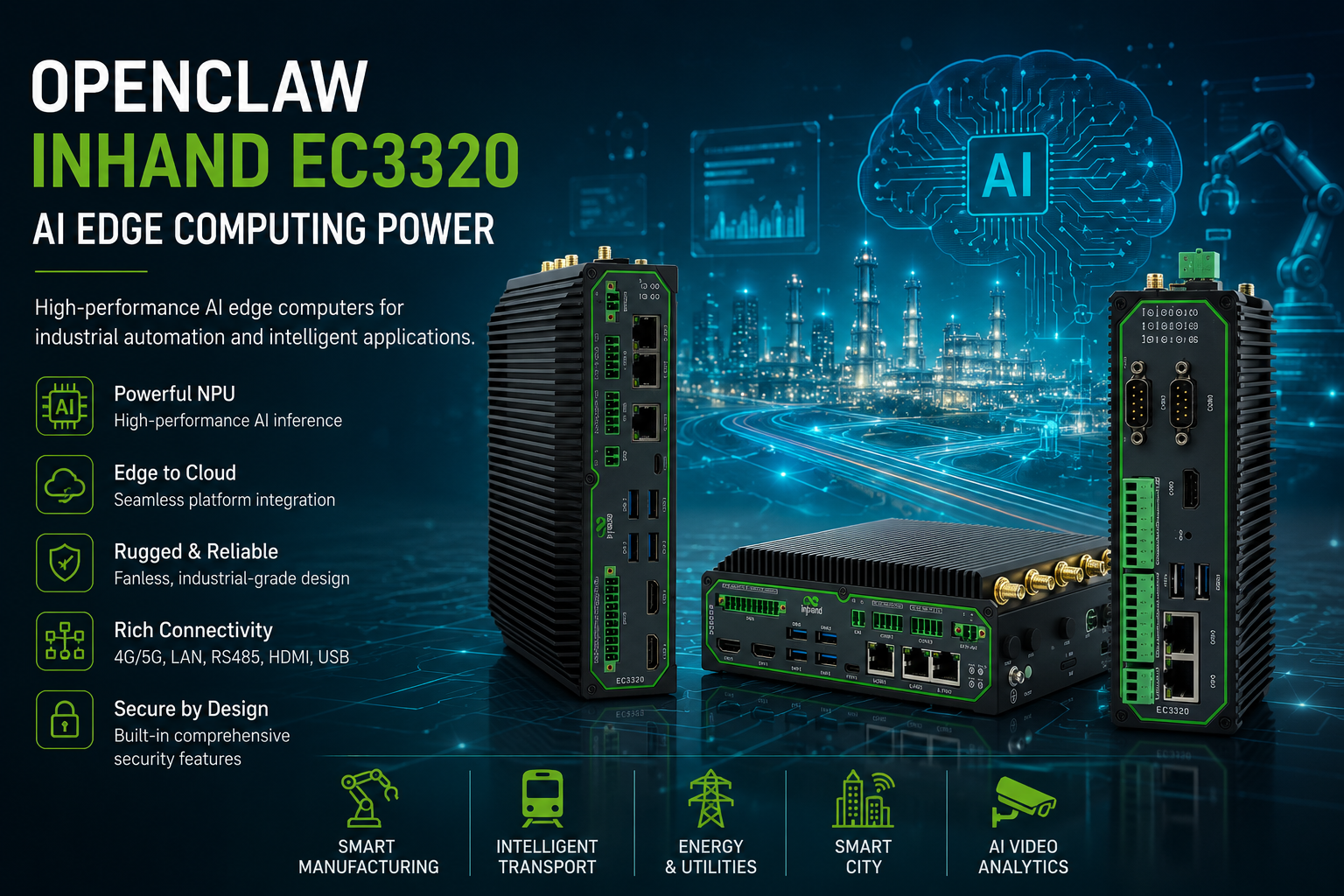
Your AI agent needs a body
There is a moment in every AI agent project where the demo stops being a demo. It happens the first time someone says the word “overnight”.
Up to that point, the agent lives on a laptop. It reads files, calls APIs, runs shell commands, and does clever things while you watch. Then somebody asks it to check a sensor every hour, summarise the week, and email the results on a Monday morning. Suddenly the question is not what the model can do. It is where the thing runs when nobody is looking at it.
The usual answers are a rented cloud instance or a small computer left switched on at home. The Mac mini under the desk has become such a common fix that it is practically a genre. Both work. Neither is infrastructure.
InHand Networks recently published a deployment guide showing OpenClaw, the open-source agent project formerly known as Clawdbot, running continuously on one of their industrial edge computers. It is a good piece of work and worth reading. But the more interesting story is not the agent. It is the box.
What OpenClaw actually is, for the OT readers
If you have spent your career around PLCs and SCADA rather than Python and Git, OpenClaw needs a short introduction, because the word “chatbot” will send you in entirely the wrong direction.
OpenClaw is an agent framework. It sits on a Linux machine with system-level permissions and can read files, execute commands, modify code, and call external APIs. You give it skills, which are documented capabilities it can invoke. You give it tools, which are descriptions of how to fetch data from your systems. You give it operating rules, which define what it is allowed to do and where the boundaries sit. Then you schedule it.
The practical result is closer to a very literal-minded junior technician than to a search box. It does not answer questions. It performs tasks, on a timer, and tells you what it found.
That distinction matters because it changes the hosting requirement completely. A chatbot can live anywhere. Something with shell access to your plant network, running unattended at three in the morning, cannot.
The device: InHand EC3320
InHand’s guide uses the EC3320 as its reference platform. It is an AI edge computer built on the Rockchip RK3588, and the specification sheet reads like someone took a decent single-board computer and then remembered that industrial sites exist.
Compute
- Quad-core ARM Cortex-A76 plus quad-core Cortex-A55, up to 2.4 GHz
- Mali-G610 MC4 GPU
- NPU rated up to 6 TOPS at INT8, with INT4, INT8 and INT16 mixed operation and framework switching across TensorFlow, MXNet, PyTorch and Caffe
- 8 GB RAM, 64 GB eMMC
- Two M.2 slots: one takes a 2242 SATA 3.0 SSD, the other takes a Hailo-8 accelerator module (Key B+M 2280) which lifts total AI compute to a claimed 26 TOPS
The Hailo-8 option is ordered as the -H8 suffix on the model code rather than fitted later by you, so decide at purchase.
Interfaces
- 3 x 10/100/1000 Mbps Ethernet
- 2 x RS232 and 2 x RS485 on industrial terminals
- 1 x CAN 2.0
- 10-pin industrial terminal carrying 4 digital inputs, 4 digital outputs and 2 ground
- 4 x USB 3.0
- 2 x HDMI 2.0
- Microphone and speaker
- 2 x Nano SIM
- Wi-Fi 802.11ac dual band, BLE 5.0, GPS where the cellular module supports it
Note the Wi-Fi is listed as station mode only. This is a client, not an access point. If you were hoping to skip a router, you were not.
Physical and environmental
- 180 x 136 x 54 mm, metal enclosure, fanless
- DIN rail or wall mount
- 9 to 36 V DC on a 2-pin industrial terminal
- Operating temperature -20 to 60 degrees C, storage -40 to 85 degrees C
- 5 to 95% RH non-condensing
- IP40
- EN61000-4 immunity at level 3 across static, radiated field, fast transient, surge, conducted disturbance and shock wave. IEC60068-2 shock, vibration and drop
Two honest caveats. IP40 means dust-protected and nothing more, so this belongs in a cabinet, not bolted to a gantry in the rain. And InHand publish no power consumption figure anywhere in the datasheet, despite the document having a heading for it. For a product whose entire pitch rests on replacing an always-on desktop, that is a strange omission, and it is worth asking your distributor for a real number before you build an energy case around it.
Models
- EC3320-NRQ3 – 5G NR SA and NSA, global bands, GPS
- EC3320-FQ09 – 4G LTE Cat 6, global bands, GPS
- EC3320-EN00 – no cellular, Ethernet only, no GPS
All three carry the same Ethernet, serial, Wi-Fi, Bluetooth, CAN, audio and I/O complement. If the box is going into a cabinet with a decent wired uplink, the EN00 saves you money you would otherwise spend on a modem you will never switch on. If it is going somewhere remote, the cellular variants give you dual SIM switchover, multi-level link detection and auto-redial, which is exactly the failover behaviour you want behind an unattended process. Worth pairing with a sensible multi-network roaming SIM rather than a single-operator tariff, because a dual SIM slot only helps if the two SIMs fail independently.
How the OpenClaw deployment actually goes
InHand’s guide is worth reading in full, and I am not going to reproduce it here. The shape of it is what matters, because it tells you what kind of machine this is.
Once the EC3320 is online, OpenClaw installs with a single shell command pulled from the project’s install script. You then run the onboarding routine and pick your LLM provider. From there the configuration is entirely files on disk:
- A
SKILL.mdunder the skills directory registers a capability. In InHand’s example it is an email sender, which calls a local Python script to fire off notifications. SMTP server, address and auth code go in environment variables rather than the file. TOOLS.mdgets a Markdown description of how to fetch your data, including the tool name, parameters and return format. This is what tells the model how to reach your actual sensors.AGENTS.mdgets the scenario prompt: operating rules and task boundaries.- A local web UI on port 18789 handles scheduling. Create a cron job, describe the task in plain language, name the skill it should use to report.
- Restart the gateway service and it runs.
InHand’s worked example is AI monitoring of transformer data in a distribution room: scheduled collection, analysis, report generation, email alert. Read the full walkthrough at InHand’s deployment guide.
The thing to notice is that there is nothing exotic here. It is Linux, Markdown files, a Python script, environment variables and cron. Any competent engineer can read that configuration six months later and understand it. Compare that to the average low-code IoT platform, where the logic is trapped in someone’s drag-and-drop canvas and the export button produces JSON that no human has ever read voluntarily.
Why the box beats the desktop
The case splits neatly depending on which side of the OT/IT fence you sit.
If you write the code
You get a Linux machine with a real NPU and framework support that is not a hobbyist distribution held together by forum posts. You get a serial port, which matters more than you think the first time you need to talk to something that predates Ethernet. You get container and application management from the cloud side, so pushing a new version does not mean SSH-ing into forty boxes. And you get an artefact that belongs to the company rather than a machine that leaves when its owner does.
If you run the plant
You get DIN rail mounting, 9 to 36 V DC input off the same supply as everything else in the cabinet, a fanless metal enclosure with no filter to change, a documented temperature range, EMC immunity at level 3, and a hardware watchdog. You get Secure Boot, with TPM 2.0 as an option. And you get a device with a serial number that appears on an asset register, which is the difference between a system and a favour.
The uncomfortable truth about the always-on desktop is not that it fails. It is that when it fails, nobody knows who owns it.
Beyond OpenClaw: what else this shape of box is for
The agent story is a good hook, but it is a narrow use of the hardware. The EC3320’s protocol list is where the industrial value actually sits, and it is a long one: Modbus RTU and TCP in both master and slave roles, EtherNet/IP, ISO on TCP, OPC UA client and server, Mitsubishi MC and CPU port, FINS UDP, HostLink and PPI. On the electricity side, DLT645-2007, IEC 101 and 104, and DNP3.0. Plus BACnet and CNC.
Manufacturing and OEE
Pull line data off mixed-vendor PLCs, normalise it locally, run anomaly detection on the NPU, and push events rather than raw streams. The Mitsubishi and Omron protocol support is telling: this is aimed at brownfield sites where the kit was bought over twenty years from whoever was cheapest that quarter.
Energy and substations
DNP3.0 and IEC 101/104 alongside DLT645 covers most of what you meet in distribution. InHand’s own transformer example is not accidental. Local analysis with cellular backhaul and dual SIM failover is a well-worn pattern for assets that sit in concrete boxes with no fixed line.
Building automation
BACnet plus 4 DI and 4 DO plus RS485 covers a lot of BMS integration work. The 6 TOPS NPU is arguably wasted here, which is a reason to look at the EN00 no-cellular variant and spend the difference elsewhere.
Vision at the edge
This is where the Hailo-8 option earns its keep. 26 TOPS is enough for meaningful object detection, occupancy counting or basic inspection without shipping video to a cloud that will bill you per frame. Two HDMI outputs and four USB 3.0 ports suggest InHand expect cameras and a local display.
Protocol translation, unglamorously
Half the industrial IoT projects I have seen over twenty-five years were, underneath the pitch deck, a box that turned one protocol into another and buffered the result when the link dropped. There is no shame in it. It is most of the value.
Where it sits in the architecture
The EC3320 occupies the same slot as any edge gateway: south of it are your PLCs, meters, sensors and cameras, speaking whatever they speak. North of it is your cloud or your SCADA. The box does the translation, the buffering, the local inference and, increasingly, the decision-making.
What has changed is the last item. An edge gateway used to forward data. This class of device runs an agent that reads the data, reasons about it, and acts. That is a meaningful shift in what sits in the middle of the diagram, and it is worth thinking about carefully before you hand shell access on your OT network to a language model with a cron entry. The boundaries you write in AGENTS.md are not documentation. They are the control system.
Access to the device, incidentally, is refreshingly conventional: plug in HDMI and a USB keyboard for a Linux desktop, SSH to the default address on ETH2, or use the local web interface on HTTPS port 9100. Credentials are on the nameplate, which is either delightfully practical or a security review waiting to happen, depending on who you ask. Change them.
The verdict
OpenClaw on an EC3320 is a neat demonstration, and InHand deserve credit for publishing a real walkthrough rather than a press release. But the interesting claim underneath it is more general: agents are becoming infrastructure, and infrastructure needs a home with a mounting bracket, a temperature rating and an owner.
If you are running an agent on a machine that somebody might unplug to charge their phone, you do not have a system. You have a hobby with an uptime graph.
More on industrial edge hardware and cellular connectivity at IoT Portal, and if you are putting a cellular variant into a metal cabinet, read up on antenna placement first. A 5G modem behind six millimetres of steel is a very expensive Ethernet adapter.
Peter Green writes about industrial IoT, cellular connectivity and the gap between what the datasheet says and what happens on site.